
Revoke API
You revoke a credential through TCS API for DIW with the cid that you got at issuance. In our tests, within about one minute after revocation, the holder’s Taiwan Digital Identity Wallet (TW DIW, “the wallet” in this handbook) shows this credential as invalid (「已失效」, or “Expired” when the phone language is English). You cannot undo a revocation.
Revoke a credential
Section titled “Revoke a credential”POST /v1/diw/credentials/{cid}/revokeIn {cid}, put the cid that you got when GET /v1/diw/issuances/{id} returned issued. Use the full value unchanged. This request has no body.
Every request must include X-API-Key. Also include x-correlation-id, and put the same value in x-request-id. See API Basics.
On success, you get 201:
{ "cid": "<cid>", "credential_status": "REVOKED"}| Field | Description |
|---|---|
cid | The same cid that you sent in the revoke request. |
credential_status | The status after revocation: REVOKED. |
The API currently cannot suspend or recover a credential.
Only the account that received this cid can revoke it. If a different account sends the same cid, that account gets 404.
Resend after a 502
Section titled “Resend after a 502”When you get 502, TCS cannot confirm whether the revocation took effect. Send the same request again:
- You get
201: the revocation is complete. - You get
400and themessagestarts withissuer module 30205: the credential is already revoked. This means that the first revocation succeeded. - You get
400and themessagestarts withissuer module, but the code is not30205: do not treat this as a successful first revocation. Contact the TCS team with the time and thex-correlation-idof both requests. - You get
502again: resend later. If you keep getting502, contact the TCS team with the time and thex-correlation-idof each request.
If you cannot tell whether the first request succeeded, contact the TCS team with the time and the x-correlation-id / x-request-id value of both requests.
For other errors, see Errors and Polling.
What you see when you verify after revocation
Section titled “What you see when you verify after revocation”After revocation, the wallet does not let the holder present this credential. A revoked credential does not appear in verification results.
After you create a verification, one of these three cases occurs:
| Credentials of the same credential type in the holder’s wallet | The result you get |
|---|---|
| Only the revoked credential | The wallet does not let the holder select this credential, so the wallet sends no data. The status stays pending (waiting) for the full timeout that you set. |
| Another valid credential, too | The holder presents the other credential. The verification passes (verify_result: true), but data[].cid is the cid of the other credential. |
| The credential you expect is not revoked | You get a verification result. Use verify_result to decide whether it passed, and still compare data[].cid. |
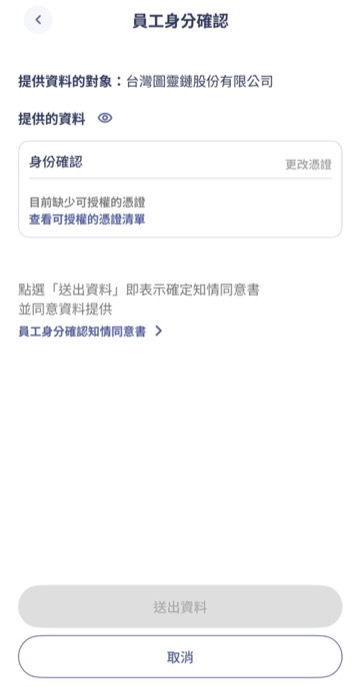
The first case in the table: the wallet says that no credential can be authorized (目前缺少可授權的憑證), and the holder cannot tap the send data button. The screen is in Chinese.
Checking only verify_result is not enough. Your system must also do two things:
-
Compare the
cid. Accept the result only ifdata[].cidequals thecredential_serialthat you stored. If you do not, you may mistake another credential that the holder presents for the credential that you revoked.data[].cidmust equal thecredential_serialthat you stored at issuance. See Verification API. -
Set your own timeout. If the verification stays
pending, end this verification when the time is up (the recommended value is 5 minutes). Tell the holder that you did not receive a usable credential. If you do not, a holder who has only the revoked credential stays on the waiting screen indefinitely.
For a diagram of the flow, see How It Works.