
Trust & Schema Governance
What is the Trust Registry?
Section titled “What is the Trust Registry?”The Trust Registry is the root of trust within a TCS deployment. Before an organization can issue or verify credentials in that deployment, it must register and receive an approved identity. This ensures every credential traces back to a known, registered entity within the deployment — eliminating anonymous issuance.
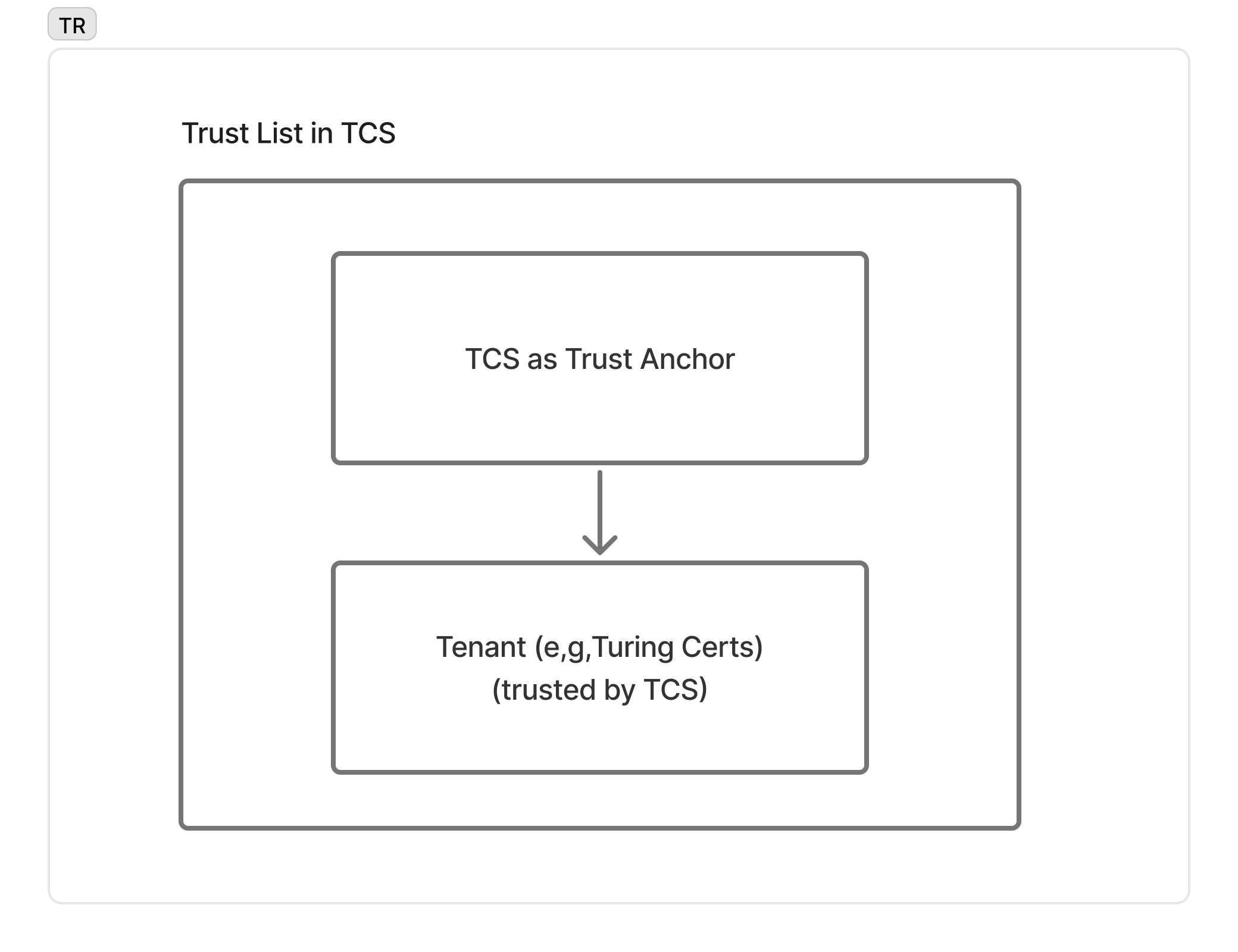
TCS operates a scoped issuer allowlist: each tenant (e.g. Turing Certs) is added to the allowlist on registration, and verifiers configured against the same Trust Registry will accept their credentials. This is intentionally a centralized governance model — it is not OpenID Federation, EBSI TIR, or an ETSI/eIDAS Trusted List. Cross-ecosystem trust (e.g. presenting a TCS-issued credential to a verifier in another ecosystem) bridges through the X.509 / x5c path with an externally-anchored CA — see Architecture & Security and the Standards Compliance roadmap.
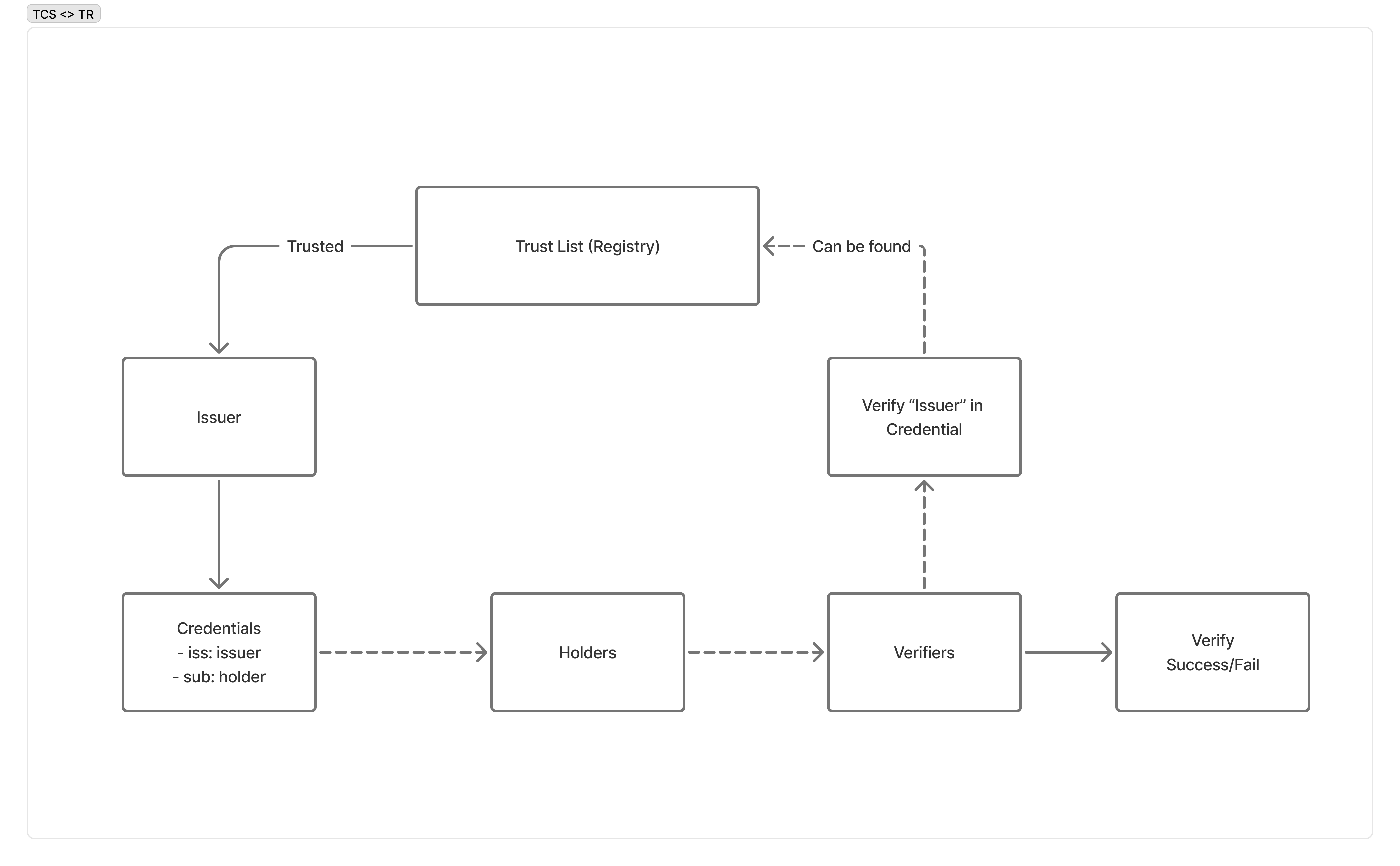
When a verifier receives a credential, it checks the iss claim against the Trust Registry’s approved issuer list — ensuring every credential traces to an organization the registry lists.
Registration Flow
Section titled “Registration Flow”Step 1: Register your organization
Section titled “Step 1: Register your organization”Registration is a single call. It creates your tenant, provisions its credential configurations from the Schema Registry, and returns your first API key in plaintext exactly once. Approval is automatic — there is no review queue, and you can issue as soon as the call returns. This is the only way a tenant comes into existence.
curl -X POST https://trust-registry.turingspace.co/v1/apply \ -H "Content-Type: application/json" \ -d '{ "name": "Acme University", "email": "admin@acme-university.edu", "password": "SecurePass123", "tenant": "acme-university", "is_issuer": true, "is_verifier": true }'Success (201 Created):
{ "uuid": "f47ac10b-58cc-4372-a567-0e02b2c3d479", "status": "APPROVED", "api_key": "tcs_production_a1b2c3d4e5f6a7b8c9d0e1f2a3b4c5d6e7f8a9b0c1d2e3f4"}Request fields
| Parameter | Type | Required | Validation |
|---|---|---|---|
name | string | Yes | 1–255 characters |
email | string | No | Valid email address, not already registered |
password | string | Yes | 8–128 characters, with at least one uppercase letter, one lowercase letter, and one digit |
tenant | string | Yes | 1–100 characters, letters / digits / hyphens / underscores; lowercased on the way in. The prefixes u-, tcs-, admin-, api- and www- are reserved |
is_issuer | boolean | No | Defaults to true |
is_verifier | boolean | No | Defaults to true |
is_issuer and is_verifier state whether your organization may issue credentials and whether it may verify presentations. They are the only capability differentiators between organizations — most hold both.
Error (409 Conflict) — the email or the tenant slug is already taken:
{ "statusCode": 409, "message": "Tenant 'acme-university' already exists"}The one response carries two distinct credentials, and they are not interchangeable:
- The API key (
api_key) — your normal means of authenticating as a machine, sent in theX-API-Keyheader onPOST /v1/offersandPOST /v1/verifier/authorization-request. - The UUID (
uuid) — together with the password you chose, exchanges for a short-lived access token used only for DID management (POST /v1/auth/loginbelow, then/v1/did/*).
Step 2: Log In
Section titled “Step 2: Log In”Exchange your UUID and password for a JWT access token. The Trust Registry rate-limits this endpoint to 5 attempts per 60 seconds.
curl -X POST https://trust-registry.turingspace.co/v1/auth/login \ -H "Content-Type: application/json" \ -d '{ "uuid": "f47ac10b-58cc-4372-a567-0e02b2c3d479", "password": "SecurePass123" }'Success (200 OK):
{ "access_token": "eyJhbGciOiJIUzI1NiJ9.eyJzdWIiOiJmNDdhYzEwYi01OGNjLTQzNzItYTU2Ny0wZTAyYjJjM2Q0NzkiLCJpYXQiOjE3MTk0MDAwMDAsImV4cCI6MTcxOTQ4NjQwMH0.signature", "expires_in": 86400}Error (401 Unauthorized):
{ "statusCode": 401, "message": "Invalid credentials"}Error (403 Forbidden):
{ "statusCode": 403, "message": "Account not approved"}| Parameter | Type | Required | Description |
|---|---|---|---|
uuid | string | Yes | UUID returned from the apply step |
password | string | Yes | Password set during registration |
Step 3: Create a DID
Section titled “Step 3: Create a DID”Create a new DID (Decentralized Identifier) anchored on the IOTA network. Send an empty body with your JWT in the Authorization header.
curl -X POST https://trust-registry.turingspace.co/v1/did \ -H "Authorization: Bearer eyJhbGciOiJIUzI1NiJ9.eyJzdWIiOiJmNDdhYzEwYi01OGNjLTQzNzItYTU2Ny0wZTAyYjJjM2Q0NzkiLCJpYXQiOjE3MTk0MDAwMDAsImV4cCI6MTcxOTQ4NjQwMH0.signature" \ -H "Content-Type: application/json"Success (201 Created):
{ "did": "did:iota:0xabcdef1234567890abcdef1234567890abcdef1234567890abcdef1234567890", "private_key": "OKP.Ed25519.eyJrdHkiOiJPS1AiLCJjcnYiOiJFZDI1NTE5IiwiZCI6Ijk4..."}Error (401 Unauthorized):
{ "statusCode": 401, "message": "Unauthorized"}Error (500 Internal Server Error):
{ "statusCode": 500, "message": "IOTA network error"}Step 4: Import an Existing DID (Alternative)
Section titled “Step 4: Import an Existing DID (Alternative)”If your organization already owns a DID anchored on the IOTA network, import it instead of creating a new one. This registers the DID in the Trust Registry without generating new key material.
curl -X POST https://trust-registry.turingspace.co/v1/did/import \ -H "Authorization: Bearer eyJhbGciOiJIUzI1NiJ9.eyJzdWIiOiJmNDdhYzEwYi01OGNjLTQzNzItYTU2Ny0wZTAyYjJjM2Q0NzkiLCJpYXQiOjE3MTk0MDAwMDAsImV4cCI6MTcxOTQ4NjQwMH0.signature" \ -H "Content-Type: application/json" \ -d '{ "did": "did:iota:0x9876543210fedcba9876543210fedcba9876543210fedcba9876543210fedcba", "private_key": "OKP.Ed25519.eyJrdHkiOiJPS1AiLCJjcnYiOiJFZDI1NTE5IiwiZCI6ImFi..." }'Success (201 Created):
{ "did": "did:iota:0x9876543210fedcba9876543210fedcba9876543210fedcba9876543210fedcba", "status": "imported"}Error (400 Bad Request):
{ "statusCode": 400, "message": "Invalid format or verification failed"}Error (404 Not Found):
{ "statusCode": 404, "message": "DID not found on IOTA network"}Error (409 Conflict):
{ "statusCode": 409, "message": "DID already imported"}Error (503 Service Unavailable):
{ "statusCode": 503, "message": "IOTA network unavailable"}| Parameter | Type | Required | Description |
|---|---|---|---|
did | string | Yes | Fully qualified IOTA DID |
private_key | string | Yes | Base64url-encoded Ed25519 private key for the DID |
DID Management
Section titled “DID Management”You have two options for establishing your DID identity:
| Create (POST /v1/did) | Import (POST /v1/did/import) | |
|---|---|---|
| Use when | Starting fresh with no existing DID | You already own a DID on IOTA |
| Key generation | TCS generates the Ed25519 keypair | You supply the existing private key |
| Network interaction | TCS anchors a new DID document on IOTA | TCS verifies the DID exists on IOTA |
| Key custody | You receive and store the private key | You already hold the private key |
In both cases, the DID is registered in the Trust Registry and linked to your organization’s account. You use this DID as the issuer identity when creating credential offers.
DID Configuration
Section titled “DID Configuration”The Trust Registry exposes a Well-Known DID Configuration endpoint for each tenant. This follows the DIF Well Known DID Configuration specification, allowing external parties to verify the link between your domain and your DID.
curl https://trust-registry.turingspace.co/.well-known/did-configuration.json/acme-universitySuccess (200 OK):
{ "@context": "https://identity.foundation/.well-known/did-configuration/v1", "linked_dids": [ { "@context": [ "https://www.w3.org/2018/credentials/v1", "https://identity.foundation/.well-known/did-configuration/v1" ], "type": ["VerifiableCredential", "DomainLinkageCredential"], "issuer": "did:iota:0xabcdef1234567890abcdef1234567890abcdef1234567890abcdef1234567890", "issuanceDate": "2025-01-15T09:00:00Z", "credentialSubject": { "id": "did:iota:0xabcdef1234567890abcdef1234567890abcdef1234567890abcdef1234567890", "origin": "https://trust-registry.turingspace.co" } } ]}This endpoint is public and requires no authentication. Wallets and verifiers use it to confirm that a DID is controlled by the entity operating the domain.
Schema Registry
Section titled “Schema Registry”The Schema Registry serves VCT (Verifiable Credential Type) metadata for all credential types supported by TCS. It is a read-only discovery service — you query it to understand the structure of credential types before issuing or verifying them.
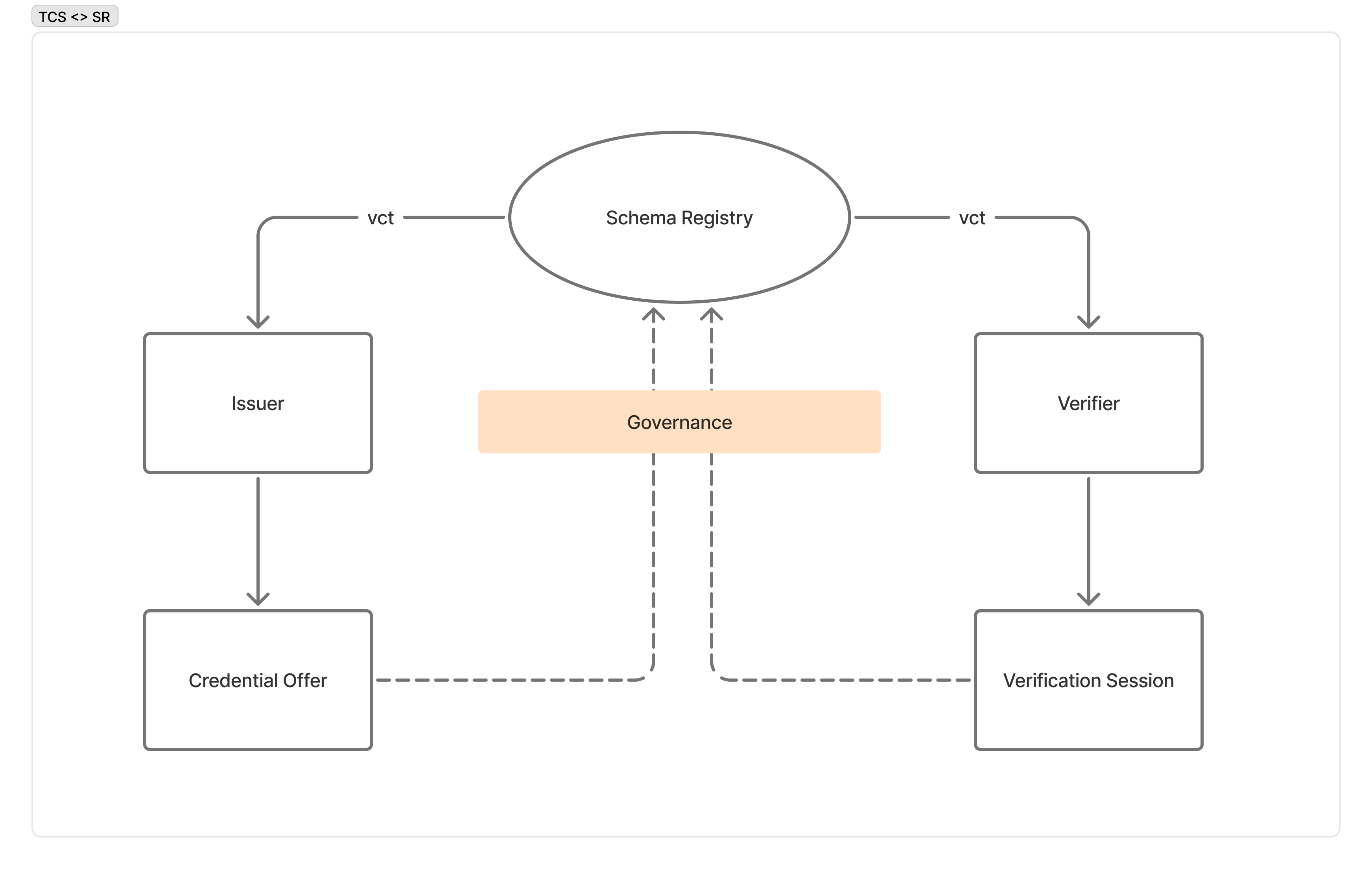
Both issuers and verifiers reference VCT metadata from the Schema Registry: issuers validate credential offers before issuance; verifiers understand credential structure during presentation verification. All credential types must be registered before issuance.
Discover a Credential Type
Section titled “Discover a Credential Type”curl https://schema-registry.turingspace.co/schemas/TuringCerts_Standard_Credential/v2Success (200 OK):
{ "vct": "https://schema-registry.turingspace.co/schemas/TuringCerts_Standard_Credential/v2", "name": "Turing Certs Standard Credential", "description": "A general-purpose verifiable credential issued through the Turing Credential Service.", "status": "active", "use_case": ["professional_qualification"], "claims": [ { "path": ["credentialName"], "mandatory": true }, { "path": ["expiredTime"], "mandatory": false } ], "schema": { "type": "object", "properties": { "credentialName": { "type": "string" }, "expiredTime": { "type": "string", "format": "date-time" } }, "required": ["credentialName"] }, "updated_at": "2026-01-15T08:00:00.000Z"}Error (404 Not Found):
{ "statusCode": 404, "message": "VCT not found"}| Path Parameter | Description |
|---|---|
type | The credential type identifier (matches the vct field in issued SD-JWT VCs) |
version | The schema version number (e.g., 1.0) |
What’s Next
Section titled “What’s Next”- Issuing Credentials — Issue SD-JWT credentials using your API key and DID
- Verifying Credentials — Verify credential presentations
- Authentication Reference — Understand all authentication patterns