
TW DIW Integration Overview
If your organization wants to issue or verify digital credentials in its own service, it can integrate through TCS, a service of Turing Space Inc. You can issue credentials to a holder’s Taiwan Digital Identity Wallet (TW DIW, “the wallet” in this handbook), and holders can present credentials with the wallet. This handbook describes how to integrate and the limits that you must understand before you go live.
Who this handbook is for
Section titled “Who this handbook is for”- Decision makers: people who decide whether to integrate. Read this page, How It Works, Limits and Notes, and Getting Started, in this order. These pages do not describe how to call the API. They contain only a small number of statuses and identifiers, for example
pending(waiting) andcid(credential identifier). - Engineers: people who do the integration. First read How It Works and Limits and Notes. Then read the pages in order, starting at API Basics. For how to request codes, see Getting Started.
The Taiwan Digital Identity Wallet is a Ministry of Digital Affairs app
Section titled “The Taiwan Digital Identity Wallet is a Ministry of Digital Affairs app”The Taiwan Digital Identity Wallet is a mobile app from the Ministry of Digital Affairs (MODA). Its Chinese name is 數位憑證皮夾. Holders keep credentials in the wallet. When an organization asks a holder to present a credential, the holder scans a QR code or opens a mobile link and presents the credential.
You integrate with TCS API for DIW only
Section titled “You integrate with TCS API for DIW only”To issue, verify, and revoke credentials, your system needs to integrate only with TCS API for DIW. The TCS team creates the credential types (VC Templates) and verification scenarios (VP Templates) that you need. See Getting Started. The TCS team gives an API Key to your organization. When your system calls the API, this key identifies your organization. TCS handles the communication with the holder’s wallet.
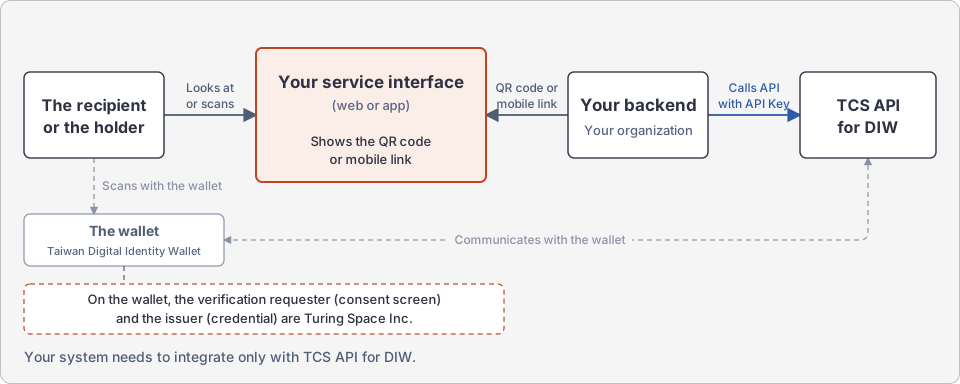
The wallet shows only Turing Space Inc. as the verification requester and the issuer
Section titled “The wallet shows only Turing Space Inc. as the verification requester and the issuer”In two places, the wallet shows Turing Space Inc., not your organization:
- During verification: the verification requester on the wallet consent screen.
- During issuance: the issuer on the credential.
The tax ID (統一編號) of Turing Space Inc. is 83588104.
If your service requires your organization to appear in these two places, an integration through TCS cannot meet this requirement. Evaluate this before you decide to integrate. You set the credential name on the card face. The card image can also show your organization’s brand. See Getting Started.
Three available features
Section titled “Three available features”- Issue: issue a credential to the holder’s wallet. You specify the content of the credential.
- Verify: ask a holder to present a credential. You get the fields on the credential and the verification result.
- Revoke: make one credential that you issued permanently invalid. You cannot restore it.
For the steps of each flow, see How It Works.
Next steps
Section titled “Next steps”- To evaluate whether to integrate: first read Limits and Notes.
- If you already have a TCS API Key: you can call TCS API for DIW now. See Getting Started.
- If you do not have a TCS API Key: contact the TCS team.