
信任與 Schema 治理
什麼是 Trust Registry?
Section titled “什麼是 Trust Registry?”Trust Registry 是單一 TCS 部署內的信任根源。組織在能夠在該部署中發行或驗證憑證之前,必須先完成註冊並取得已核准的身份。這確保每張憑證都可追溯至已知、已完成註冊的實體 — 消除匿名發行的可能性。
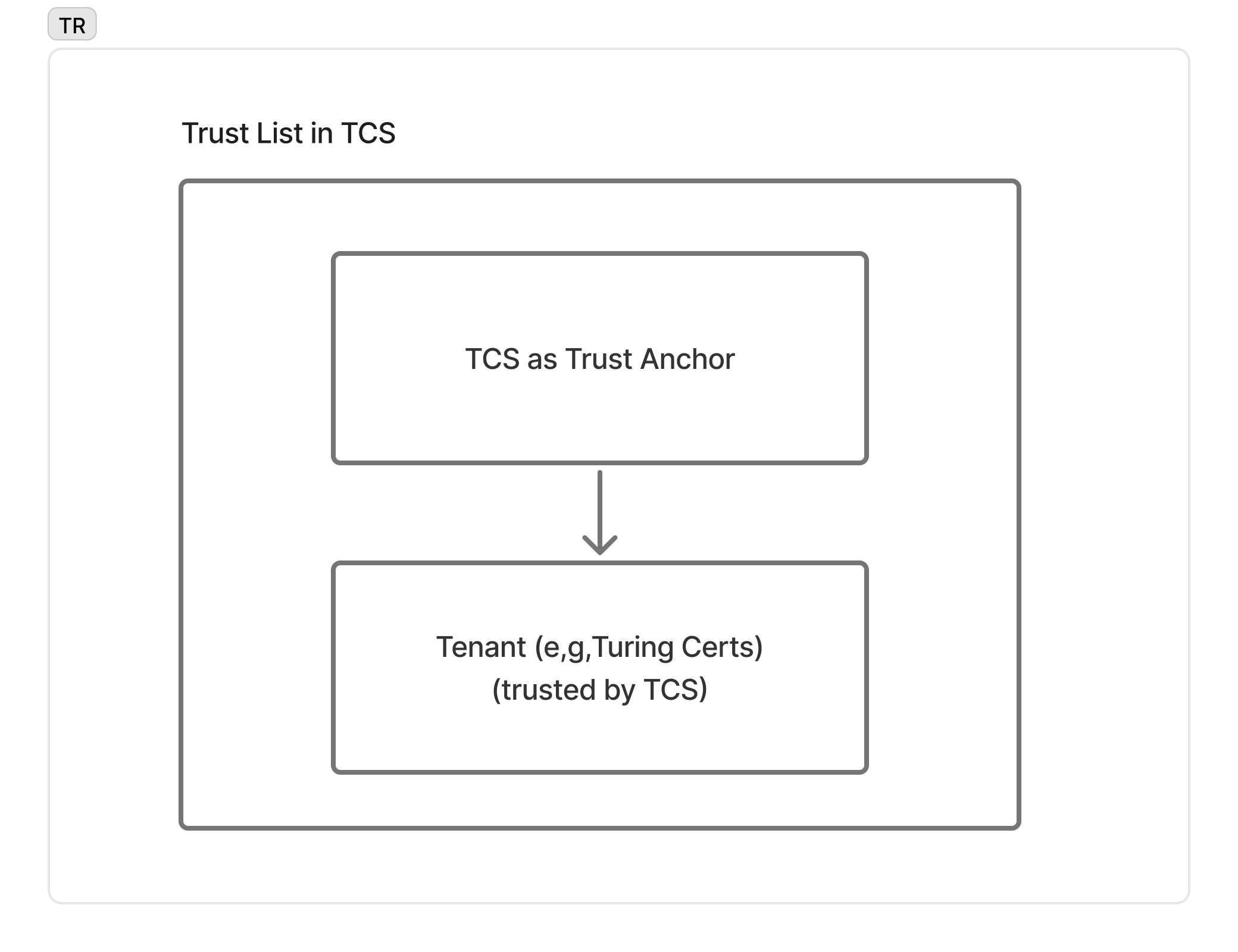
TCS 採用範圍限定的發行者允許清單(scoped issuer allowlist):每個租戶(例如 Turing Certs)在完成註冊時即加入清單,並由設定使用同一個 Trust Registry 的驗證者所接受。這是刻意採取的中心化治理模式 — 並非 OpenID Federation、EBSI TIR 或 ETSI/eIDAS 信任清單。跨生態系信任(例如將 TCS 發行的憑證呈現給其他生態系的驗證者)需透過 X.509 / x5c 路徑橋接到外部根 CA — 詳見架構與安全及標準合規路線圖。
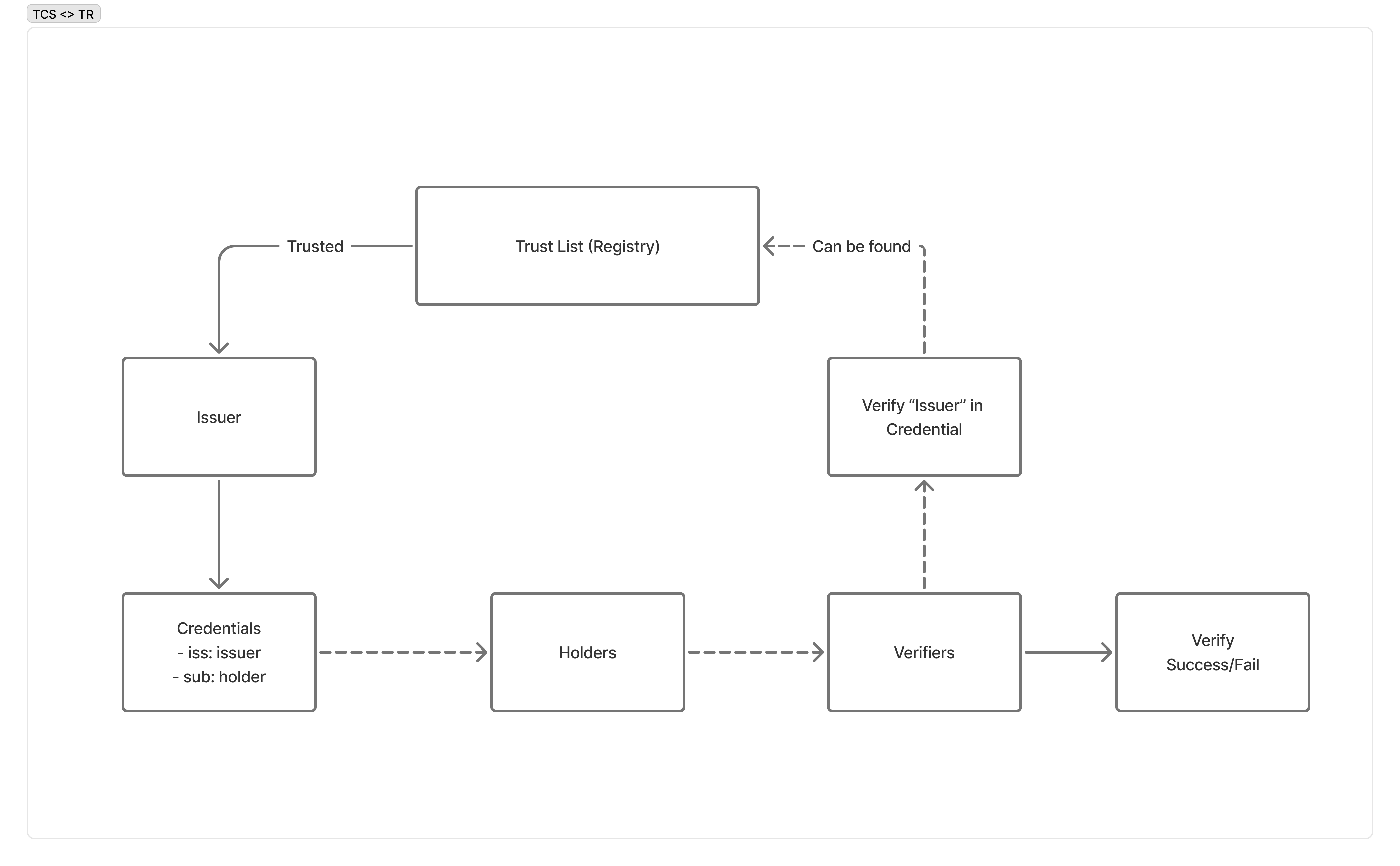
驗證方收到憑證時,會對照 Trust Registry 的已核准發行方清單檢查 iss 聲明,確保每張憑證都能追溯至登錄清單上的組織。
第一步:註冊你的組織
Section titled “第一步:註冊你的組織”註冊只需一次呼叫。它會建立你的租戶、從 Schema Registry 佈建該租戶的憑證設定,並以明文回傳你的第一把 API key,僅此一次。核准是自動的 — 沒有審核佇列,呼叫一回來你就能開始發證。這是租戶誕生的唯一途徑。
curl -X POST https://trust-registry.turingspace.co/v1/apply \ -H "Content-Type: application/json" \ -d '{ "name": "Acme University", "email": "admin@acme-university.edu", "password": "SecurePass123", "tenant": "acme-university", "is_issuer": true, "is_verifier": true }'成功(201 Created):
{ "uuid": "f47ac10b-58cc-4372-a567-0e02b2c3d479", "status": "APPROVED", "api_key": "tcs_production_a1b2c3d4e5f6a7b8c9d0e1f2a3b4c5d6e7f8a9b0c1d2e3f4"}請求欄位
| 參數 | 類型 | 必填 | 驗證規則 |
|---|---|---|---|
name | string | 是 | 1–255 字元 |
email | string | 否 | 合法 email 位址,且尚未被註冊 |
password | string | 是 | 8–128 字元,並含至少一個大寫字母、一個小寫字母與一個數字 |
tenant | string | 是 | 1–100 字元,可用英文字母 / 數字 / 連字號 / 底線;進入時會轉為小寫。u-、tcs-、admin-、api-、www- 為保留前綴 |
is_issuer | boolean | 否 | 預設 true |
is_verifier | boolean | 否 | 預設 true |
is_issuer 與 is_verifier 表示你的組織是否可發行憑證、是否可驗證出示。這是組織之間唯一的能力差異 — 多數組織兩者兼具。
錯誤(409 Conflict) — email 或 tenant slug 已被使用:
{ "statusCode": 409, "message": "Tenant 'acme-university' already exists"}這一次回應帶回兩組互不相同的憑證,且不可互換:
- API key(
api_key)—— 你以機器身分呼叫時的常規認證方式,用於POST /v1/offers與POST /v1/verifier/authorization-request的X-API-Keyheader。 - UUID(
uuid)—— 搭配你自訂的密碼,可換取短期 access token,僅用於 DID 管理(下方POST /v1/auth/login,接著/v1/did/*)。
第二步:登入
Section titled “第二步:登入”以你的 UUID 和密碼換取 JWT access token。Trust Registry 對此端點限制每 60 秒最多 5 次嘗試。
curl -X POST https://trust-registry.turingspace.co/v1/auth/login \ -H "Content-Type: application/json" \ -d '{ "uuid": "f47ac10b-58cc-4372-a567-0e02b2c3d479", "password": "SecurePass123" }'成功(200 OK):
{ "access_token": "eyJhbGciOiJIUzI1NiJ9.eyJzdWIiOiJmNDdhYzEwYi01OGNjLTQzNzItYTU2Ny0wZTAyYjJjM2Q0NzkiLCJpYXQiOjE3MTk0MDAwMDAsImV4cCI6MTcxOTQ4NjQwMH0.signature", "expires_in": 86400}錯誤(401 Unauthorized):
{ "statusCode": 401, "message": "Invalid credentials"}錯誤(403 Forbidden):
{ "statusCode": 403, "message": "Account not approved"}| 參數 | 類型 | 必填 | 說明 |
|---|---|---|---|
uuid | string | 是 | 申請步驟回傳的 UUID |
password | string | 是 | 註冊時設定的密碼 |
第三步:建立 DID
Section titled “第三步:建立 DID”建立一個錨定在 IOTA 網路上的新 DID(去中心化識別符)。傳送空 body,並在 Authorization header 中帶入你的 JWT。
curl -X POST https://trust-registry.turingspace.co/v1/did \ -H "Authorization: Bearer eyJhbGciOiJIUzI1NiJ9.eyJzdWIiOiJmNDdhYzEwYi01OGNjLTQzNzItYTU2Ny0wZTAyYjJjM2Q0NzkiLCJpYXQiOjE3MTk0MDAwMDAsImV4cCI6MTcxOTQ4NjQwMH0.signature" \ -H "Content-Type: application/json"成功(201 Created):
{ "did": "did:iota:0xabcdef1234567890abcdef1234567890abcdef1234567890abcdef1234567890", "private_key": "OKP.Ed25519.eyJrdHkiOiJPS1AiLCJjcnYiOiJFZDI1NTE5IiwiZCI6Ijk4..."}錯誤(401 Unauthorized):
{ "statusCode": 401, "message": "Unauthorized"}錯誤(500 Internal Server Error):
{ "statusCode": 500, "message": "IOTA network error"}第四步:匯入現有 DID(替代方案)
Section titled “第四步:匯入現有 DID(替代方案)”若你的組織已擁有錨定在 IOTA 網路上的 DID,可以匯入而非建立新的。這會在 Trust Registry 中登記該 DID,無需生成新的金鑰素材。
curl -X POST https://trust-registry.turingspace.co/v1/did/import \ -H "Authorization: Bearer eyJhbGciOiJIUzI1NiJ9.eyJzdWIiOiJmNDdhYzEwYi01OGNjLTQzNzItYTU2Ny0wZTAyYjJjM2Q0NzkiLCJpYXQiOjE3MTk0MDAwMDAsImV4cCI6MTcxOTQ4NjQwMH0.signature" \ -H "Content-Type: application/json" \ -d '{ "did": "did:iota:0x9876543210fedcba9876543210fedcba9876543210fedcba9876543210fedcba", "private_key": "OKP.Ed25519.eyJrdHkiOiJPS1AiLCJjcnYiOiJFZDI1NTE5IiwiZCI6ImFi..." }'成功(201 Created):
{ "did": "did:iota:0x9876543210fedcba9876543210fedcba9876543210fedcba9876543210fedcba", "status": "imported"}錯誤(400 Bad Request):
{ "statusCode": 400, "message": "Invalid format or verification failed"}錯誤(404 Not Found):
{ "statusCode": 404, "message": "DID not found on IOTA network"}錯誤(409 Conflict):
{ "statusCode": 409, "message": "DID already imported"}錯誤(503 Service Unavailable):
{ "statusCode": 503, "message": "IOTA network unavailable"}| 參數 | 類型 | 必填 | 說明 |
|---|---|---|---|
did | string | 是 | 完整的 IOTA DID |
private_key | string | 是 | DID 對應的 Base64url 編碼 Ed25519 私鑰 |
DID 管理
Section titled “DID 管理”你有兩種方式建立 DID 身份:
| 建立(POST /v1/did) | 匯入(POST /v1/did/import) | |
|---|---|---|
| 使用時機 | 從零開始,尚無現有 DID | 你已在 IOTA 上擁有 DID |
| 金鑰生成 | TCS 生成 Ed25519 金鑰對 | 你提供現有的私鑰 |
| 網路互動 | TCS 在 IOTA 上錨定新的 DID 文件 | TCS 驗證 IOTA 上是否存在該 DID |
| 金鑰保管 | 你接收並儲存私鑰 | 你已持有私鑰 |
兩種情況下,DID 都會在 Trust Registry 中登記並與你的組織帳號連結。建立憑證 offer 時,你以此 DID 作為發行方身份。
DID Configuration
Section titled “DID Configuration”Trust Registry 為每個租戶公開 Well-Known DID Configuration 端點。這遵循 DIF Well Known DID Configuration 規範,讓外部各方可驗證你的網域與 DID 之間的連結。
curl https://trust-registry.turingspace.co/.well-known/did-configuration.json/acme-university成功(200 OK):
{ "@context": "https://identity.foundation/.well-known/did-configuration/v1", "linked_dids": [ { "@context": [ "https://www.w3.org/2018/credentials/v1", "https://identity.foundation/.well-known/did-configuration/v1" ], "type": ["VerifiableCredential", "DomainLinkageCredential"], "issuer": "did:iota:0xabcdef1234567890abcdef1234567890abcdef1234567890abcdef1234567890", "issuanceDate": "2025-01-15T09:00:00Z", "credentialSubject": { "id": "did:iota:0xabcdef1234567890abcdef1234567890abcdef1234567890abcdef1234567890", "origin": "https://trust-registry.turingspace.co" } } ]}此端點為公開,無需身份驗證。錢包和驗證方使用它確認 DID 由運作該網域的實體所控制。
Schema Registry
Section titled “Schema Registry”Schema Registry 為 TCS 支援的所有憑證類型提供 VCT(Verifiable Credential Type)元資料服務。它是一個唯讀的探索服務 — 你查詢它以了解憑證類型的結構,在發行或驗證前做好準備。
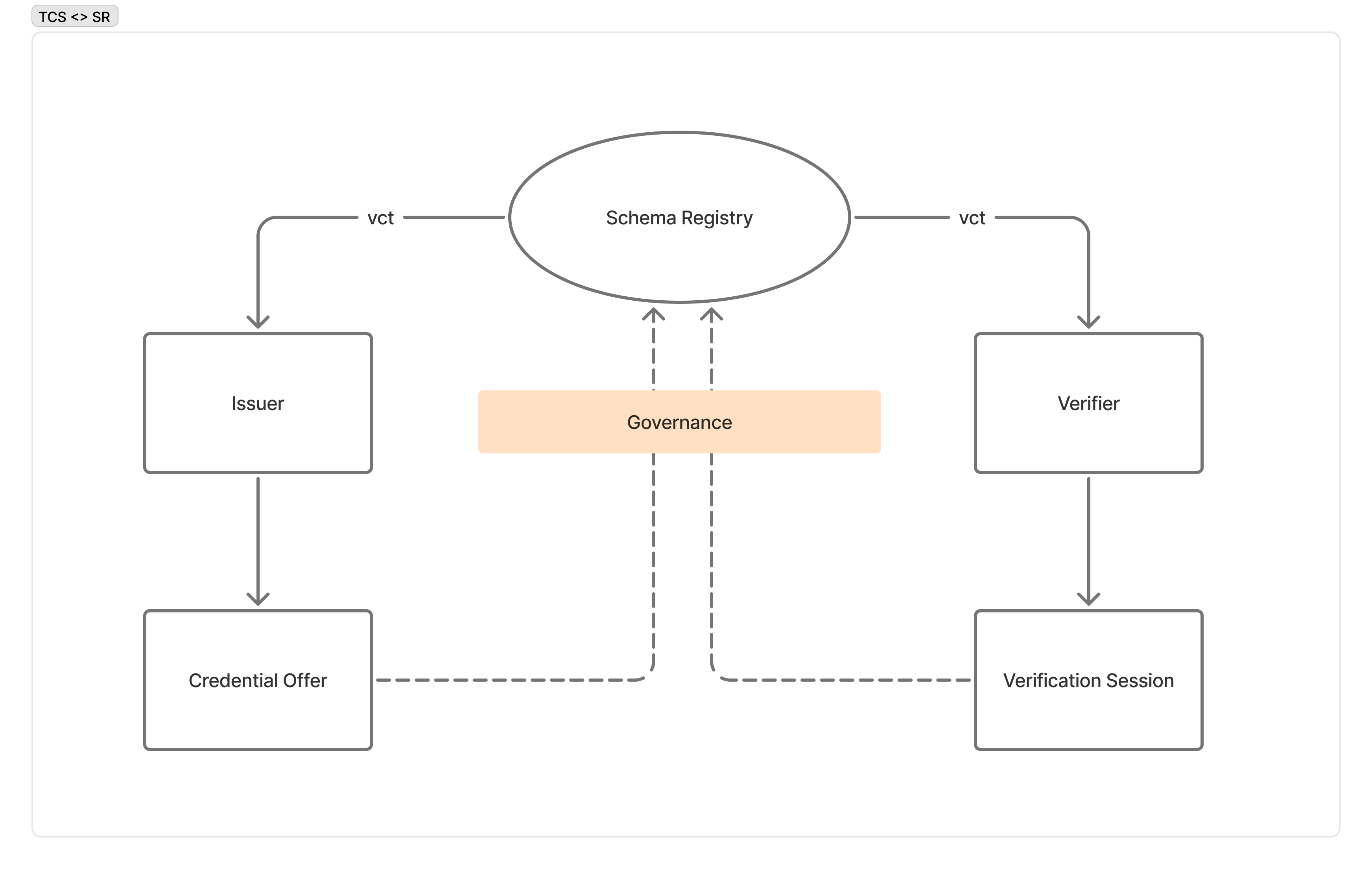
發行方和驗證方都從 Schema Registry 參考 VCT 元資料:發行方用它在發行前驗證憑證 offer;驗證方用它在 presentation 驗證期間了解憑證結構。所有憑證類型在發行前必須完成登記。
探索憑證類型
Section titled “探索憑證類型”curl https://schema-registry.turingspace.co/schemas/TuringCerts_Standard_Credential/v2成功(200 OK):
{ "vct": "https://schema-registry.turingspace.co/schemas/TuringCerts_Standard_Credential/v2", "name": "Turing Certs Standard Credential", "description": "A general-purpose verifiable credential issued through the Turing Credential Service.", "status": "active", "use_case": ["professional_qualification"], "claims": [ { "path": ["credentialName"], "mandatory": true }, { "path": ["expiredTime"], "mandatory": false } ], "schema": { "type": "object", "properties": { "credentialName": { "type": "string" }, "expiredTime": { "type": "string", "format": "date-time" } }, "required": ["credentialName"] }, "updated_at": "2026-01-15T08:00:00.000Z"}錯誤(404 Not Found):
{ "statusCode": 404, "message": "VCT not found"}| 路徑參數 | 說明 |
|---|---|
type | 憑證類型識別符(與已發行 SD-JWT VC 中的 vct 欄位相符) |
version | Schema 版本號(例如 1.0) |